Receipt Window
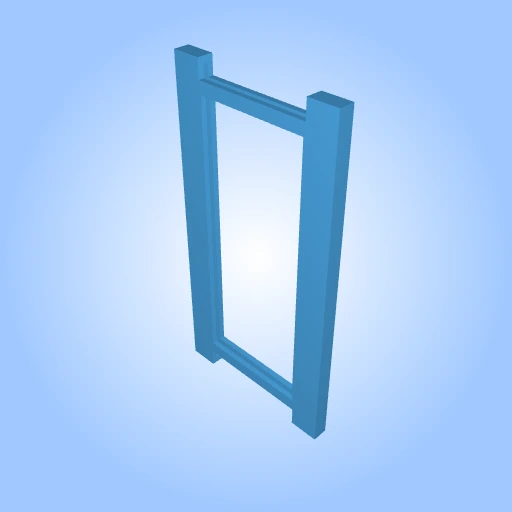
2-receipt_window3.stl
7KB
Receipt Window by miran is licensed under the
CC-Attribution - NoncommercialLicense

By downloading, you agree to MakerTouch's Terms of Service and Privacy Policy.
- Description
- More Details
Size: Large (more than 10cm)
Frame a curled receipt for a clearer view.
A thin frame with a long open window and paper channels along the sides. Feed a receipt through the end slot so its edges sit in the channels and the printed area stays visible. The ends remain outside the frame and can curl.
How it works
Feed the receipt into the end slot and pull it through until the part you want to read sits in the open window. The side channels hold the paper edges. Fit and flattening depend on the receipt width, thickness and creases.
Design features
• Side channels guide the paper edges through the frame
• Large 72 x 176 mm window shows the print
• Open paper-exit notches at both ends
• Overall size 112.0 x 216.0 x 10.0 mm
Colors
Shown in terracotta. This is a single-piece print; use any filament color you like.
Print setup
Print flat on its broad face. Check the narrow paper channels in the slicer and clear them after printing.
Suggested starting point: 0.2 mm layers, 3 perimeters, 20% infill. Adjust for your printer and material. The test slice used a 250 x 250 mm bed.
Build and use
Step 1. Print the frame flat on the build plate.
Step 2. Check that the slot is clear along its full length.
Step 3. Feed a receipt in at one end of the slot.
Step 4. Pull it through until the part you want to read sits in the window.
License
Receipt Window by miran is licensed under the
CC-Attribution - Noncommercial Dimensions: 112mm × 216mm


Add a commentComments