Label Ramp
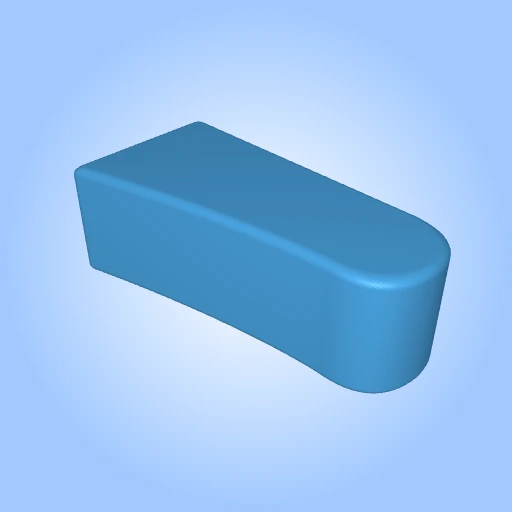
13-04_label_ramp.stl
6MB
Label Ramp by leam is licensed under the
CC-Attribution - NoncommercialLicense

By downloading, you agree to MakerTouch's Terms of Service and Privacy Policy.
- Description
- More Details
Size: Large (more than 10cm)
Lift sticker corners without fingernails.
A wedge with a concave slope and a rounded front shoulder. Pull a label strip over the shoulder to bend the backing paper and help lift the sticker edge.
How it works
Lay the label strip on the slope and draw it over the rounded front shoulder. Bending the backing there is intended to lift the sticker edge, rather than peeling along the slope. Peel performance depends on the label stock.
Design features
• Concave slope guides the strip
• Rounded shoulder is intended to bend the backing and lift the label
• Solid wedge, sits steady on the desk
• Overall size 128.0 x 46.0 x 61.3 mm
Colors
Shown in plum. This is a single-piece print; use any filament color you like.
Print setup
Print on the flat base. Supports were enabled in the test slice. Inspect overhangs in your slicer before printing and remove supports carefully.
Suggested starting point: 0.2 mm layers, 3 perimeters, 20% infill. Adjust for your printer and material. The test slice used a 250 x 250 mm bed.
Build and use
Step 1. Print on the flat base with supports as required by your slicer.
Step 2. Remove supports and lightly sand the shoulder so it is smooth.
Step 3. Place the wedge on the desk.
Step 4. Pull the backing down around the front shoulder. If the sticker lifts, pick up its edge; do not force the strip.
License
Label Ramp by leam is licensed under the
CC-Attribution - Noncommercial Dimensions: 70mm × 90mm


Add a commentComments